KB No. 23: Olfeo detection rules with Siem Sekoia
Background
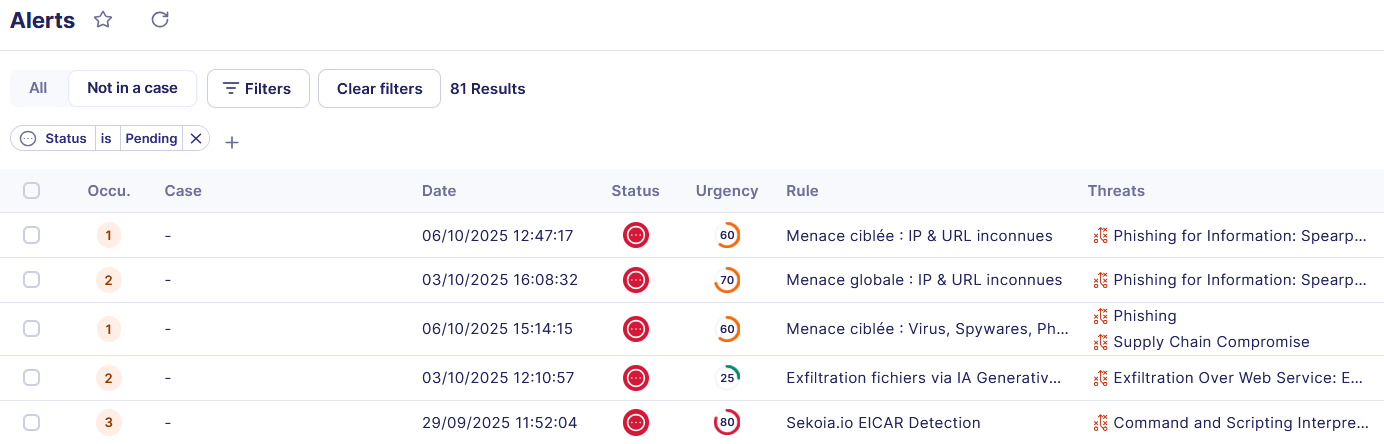
This article discusses the integration of Olfeo SaaS logs into the Sekoia platform in order to enhance visibility of threats related to web browsing and the use of online services. It presents a few examples of alerts that can be implemented to identify abnormal or malicious behavior: access to sites categorized as risky, attempts to bypass filtering policies, phishing attempts, data exfiltration, or attempts to communicate with command and control infrastructures.
Prerequisites
- Of course, you must have configured the Olfeo Log Connector. To do so, here is the Olfeo operating documentation and the Sekoia operating documentation.
- This feature requires a special Olfeo license. For more information, please contact the Olfeo sales team.
Olfeo input data
Olfeo's raw logs are transformed by the Sekoia parser into fields that can be easily used to generate Alerts, Queries, or Dashboards. Here is a non-exhaustive list of fields that can be used:
| Name | Description |
| category_label | Categories of the requested web resource |
| theme_label | Themes of the requested web resource |
| URL | Request URL |
| domain | Domain (FQDN) of the request |
| action | Olfeo filtering decision: Deny, Allow, or Deny with overtight |
| timestamp | Event timestamp |
| dest_ip | Destination IP |
| threat | Name of the threat detected by Olfeo's flow antivirus (empty if none) |
| display_name | Full name of the user, as synchronized by your directory |
| user_id | Unique user ID |
| directory_name | Directory name (as it appears in your admin interface) |
| http_method | The HTTP method (GET, POST, PUT, etc.) |
| http_version | The version of the HTTP protocol used for this connection (1.0, 1.1, 2.0, etc.) |
| src_port | Port used on the workstation that made the request |
| user_sent_bytes | Request size (body and headers) |
| user_received_bytes | Size of the response returned to the user (body and headers) |
| user_status_code | HTTP code for the status of the response returned by Olfeo SaaS to the user |
Sekoia Rules Catalog
The Sekoia SIEM offers a catalog of detection rules (built-in), maintained and verified by their teams. Currently numbering around a thousand, these rules cover various scenarios for detecting intrusions, threatening behavior, and anomalies.
The Olfeo input format is compatible with around fifty of these rules, which we therefore recommend you activate.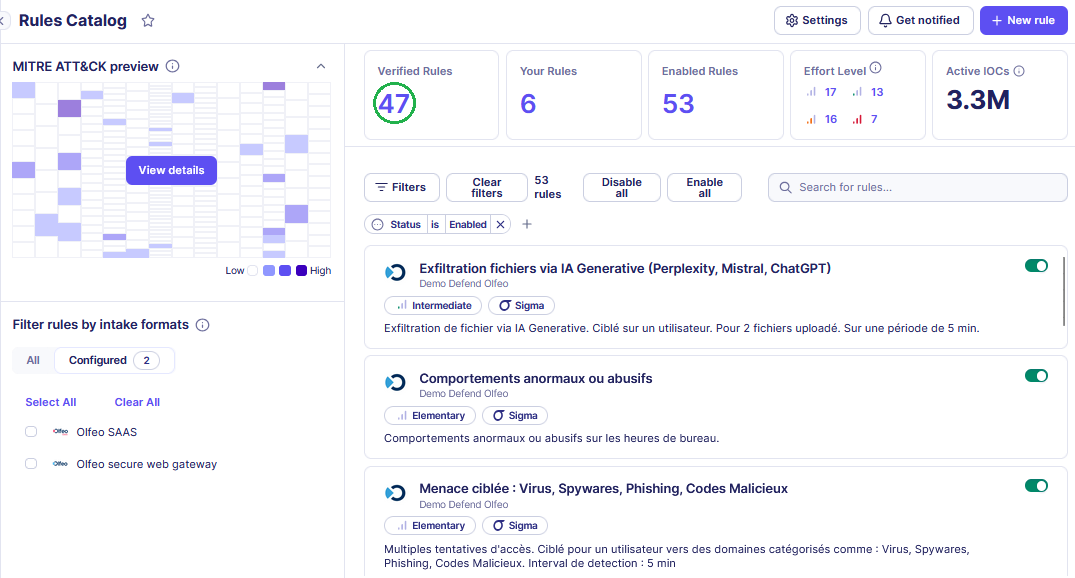
Custom rules
In this section, we will present some examples of alerts that take advantage of the specific features of the Olfeo SaaS product.
In these examples, we mainly use three variables that can be adjusted according to the size of your organization, your users' browsing habits, and your technical environment. The goal is to trigger the most relevant alerts possible and avoid false positives.
- X => Number of requests
- Y => Number of users
- T => Period in minutes
1 – Security alerts and technical threats
Alerts associated with a malicious campaign via domains identified as belonging to the " Viruses, Spyware, Phishing, Malicious Code " category:
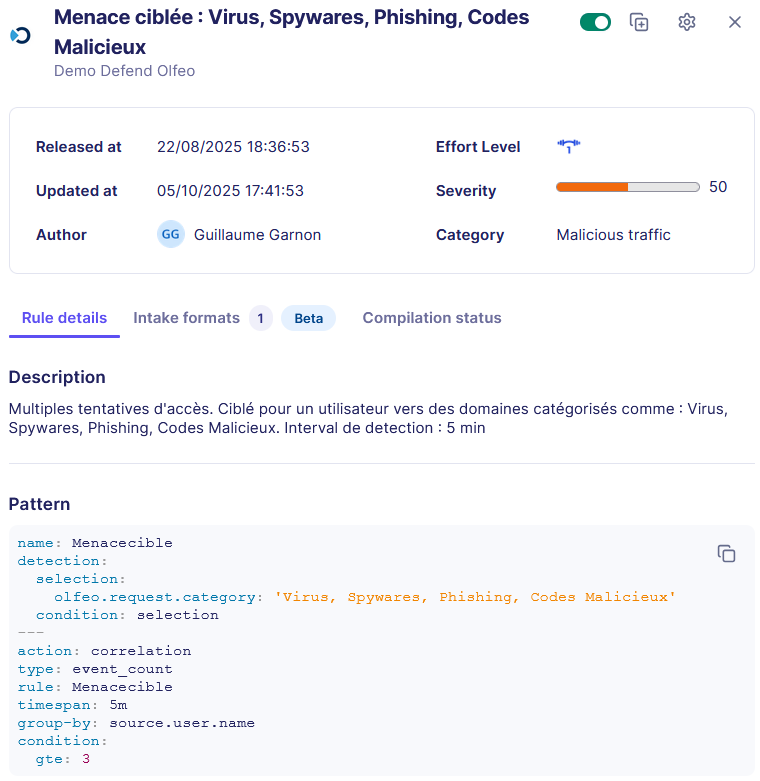
Alert 1 (user-focused): Correlation of access attempts to the Virus, Spyware, Phishing, and Malicious Code categories grouped by user, generating an alert if X access attempts occur within a time window T. Example of how to configure this rule via the Sekoia interface:
- Edit a new rule: + New rule
- Name: Targeted Threat: Viruses, Spyware, Phishing, Malicious Code
- Description: Multiple (X) access attempts. Targeted at a user for domains categorized as: Viruses, Spyware, Phishing, Malicious Code. Detection interval: T min
- Effort: Elementary (field indicating the effort required to adjust the rule before going into production)
- Detected Treat(s): Here you can choose techniques from MITRE ATT&CK's matrix, in our case: Supply Chain Compromise and Phishing.
- Specify your Detection patterns: This section allows you to set the detection and correlation strategy using SIGMA rules. For this rule, the pattern is as follows:
name: Menacecible
detection:
selection:
olfeo.request.category: 'Viruses, Spyware, Phishing, Malicious Code'
condition: selection
---
action: correlation
type: event_count
rule: Menacecible
timespan: T
group-by: source.user.name
condition:
gte: X
- Category: Malicious Traffic (with blacklist type)
- Severity: 50%
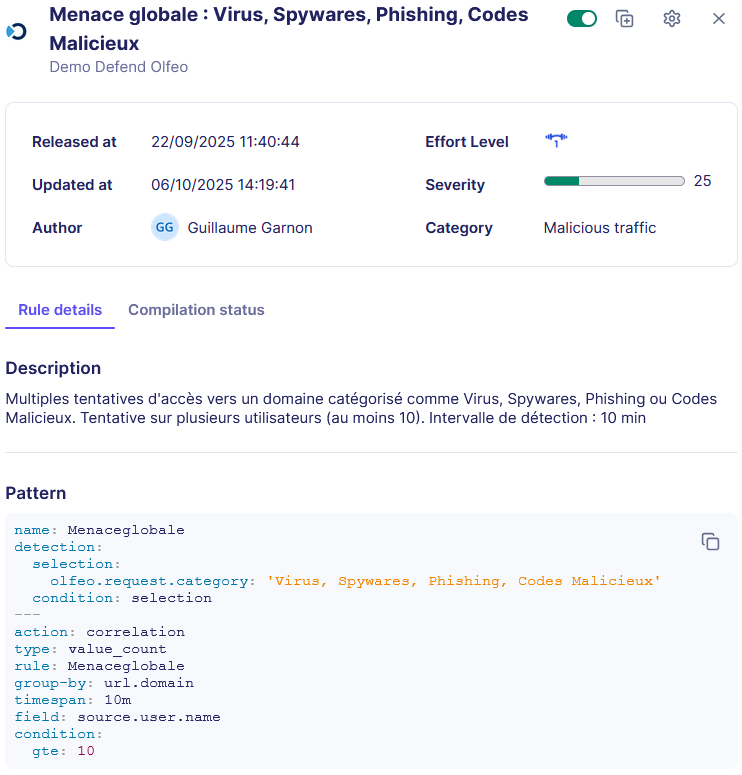
Alert 2 (focused on a web resource): Correlation of access attempts on theVirus, Spyware, Phishing, and Malicious Code categoriesgrouped by IP/URL, and an alert is generated if Y users attempt to access them within a time window T. Example of configuration of this rule via the Sekoia interface:
- Edit a new rule: + New rule
- Name: Global Threat: Viruses, Spyware, Phishing, Malicious Code
- Description: Multiple attempts to access domains categorized as viruses, spyware, phishing, or malicious code. Attempt concerning Y users. Detection interval: T min
- Effort: Elementary (field indicating the effort required to adjust the rule before going into production)
- Detected Treat(s): Here you can choose techniques from MITRE ATT&CK's matrix, in our case: Supply Chain Compromise and Phishing.
- Specify your Detection patterns: This section allows you to set the detection and correlation strategy using SIGMA rules. For this rule, the pattern is as follows:
name: GlobalThreat
detection:
selection:
olfeo.request.category: 'Viruses, Spyware, Phishing, Malicious Code'
condition: selection
---
action: correlation
type: value_count
rule: GlobalThreat
group-by: url.domain
timespan: T
field: source.user.name
condition:
gte: Y
- Category: Malicious Traffic (with blacklist type)
- Severity: 50%
Alerts associated with a malicious campaign via unknown URLs or IP addresses:
Alert 1 (user-focused): Correlation of access attempts to unknown IP categories or unknown URLs grouped by user, and an alert is generated if X access attempts are made within a time window T.
Alert 2 (focused on multiple users):Correlation of access attempts on unknown IP categories or unknown URLs grouped by IP/URL, and an alert is generated if Y users attempt to access them within a time window T.
Note: Unknown IP categories or unknown URLs are, by definition, not verified by the Olfeo classification team and may therefore be the source of numerous threats (phishing, C2, malicious code, etc.). Blocking these two categories enables a Zero Trust approach.
Alerts associated with malvertising or C2 servers:
Alert 1 (user-focused): Correlation of access attempts tothe Parked Domains or Caches categories grouped by user, and an alert is generated if X access attempts are made within a time window T.
Alert 2 (focused on multiple users): Correlation of access attempts on the Parked Domains or Caches categories grouped by IP/URL, and an alert is generated if Y users attempt to access them within a time window T.
Alerts associated with attempts to bypass filtering/data exfiltration through the use of unauthorized proxies, redirectors, and VPNs:
Alert 1 (user-focused): Correlation of access attempts to the Proxies and Redirectors category grouped by user, and an alert is generated if X access attempts are made within a time window T.
Alert 2 (focused on multiple users):Correlation of access attempts on the Proxies andRedirectors categorygrouped by IP/URL, and an alert is generated if Y users attempt to access it within a time window T.
2 – Alerts concerning data leak risks
Alerts associated with excessive file uploads to generative AI:
Alert 1 (user-focused): Detect X file uploads to the category Generative AI for a user on T min. The example below of how to configure this alert works for ChatGPT, Mistral, and Perplexity generative AI. During upload, a request with a URL containing "upload" or "uploadFilre" is systematically sent for ChatGPT, Mistral, and Perplexity AI (rule not verified for other AI). Example of how to configure this rule via the Sekoia interface:
- Edit a new rule: + New rule
- Name: File exfiltration via Generative AI (Perplexity, Mistral, ChatGPT)
- Description: File exfiltration via Generative AI. Targeted at one user. For 2 uploaded files. Over a period of T min.
- Effort: Intermediate (field indicating the effort required to adjust the rule before going into production)
- Detected Treat(s): Here you can choose techniques from the MITRE ATT&CK matrix, in our case: Exfiltration Over Web Service: Exfiltration to Cloud Storage.
- Specify your Detection patterns: This section allows you to set the detection and correlation strategy using SIGMA rules. For this rule, the pattern is as follows:
name: Exfiltration
detection:
  selection1:
    olfeo.request.category: 'Generative AI'
  selection2 :
    url.original|contains:
      - upload
      - uploadFile
  condition: selection1 and selection2
---
action: correlation
type: event_count
rule: Exfiltration
timespan: 5m
group-by: source.user.name
condition:
  gte: 2
Warning associated with excessive use of online storage tools:
Alert 1 (user-focused): Correlation of access attempts to the online data storage category grouped by user, and an alert is generated if X access attempts are made within a time window T.
Alert 2 (focused on multiple users): Correlation of access attempts to the online data storage category grouped by IP/URL, and an alert is generated if Y users attempt to access it within a time window T.
3 – Alerts concerning abnormal or abusive behavior
Alert associated with abusive behavior during office hours:
Alert 1 (user-focused): Correlation of access attempts to the theme Entertainment and Society grouped by user, and an alert is generated if X access attempts are made within a time window T and during office hours. Example of how to configure this rule via the Sekoia interface:
- Create a rule based on the same principle as the previous examples.
- Then, modify this rule so that it only applies during office hours: + Alert filter
- Name: HO filter
- Description: Activation rule during office hours
- Sigma pattern: This section allows you to edit the rule's detection time window. For example, from 8 a.m. to 9 a.m. Monday through Wednesday:
detection:
  working_hours_utc:
    timestamp|timerange: 08:00-19:00
  working_days:
    timestamp|day_of_week:
      - Monday
      - Tuesday
      - Wednesday
  condition: working_hours_utc and working_days
4 – Legal compliance and criminal risk alerts
Alert associated with excessive attempts to access resources that pose a criminal risk:
Alert 1 (user-focused):Correlation of access attempts tothe Legal Risk theme grouped by user, and an alert is generated if X access attempts are made within a time window T.
Alert 2 (focused on multiple users): Correlation of access attempts to the Legal Riskthemegrouped by IP/URL, and an alert is generated if Y users attempt to access it within a time window T.