
KB No. 1962: AUTHENTICATION POP-UP ON CERTAIN WEBSITES
Some websites open a manual identification pop-up each time you visit.
Symptom
Some websites open a manual identification pop-up each time you visit.
Background
Some sites do not use NTLM authentication, but instead use "basic" authentication. This results in a manual identification pop-up appearing each time the site is visited (Windows Update sites and certain sites using Java applets are particularly affected). To avoid this manual authentication for the user, an Olfeo filtering exception must be created on the HTTP proxy for a URL or domain.
Tests
Go to the proxy configuration menu to add ACLs:
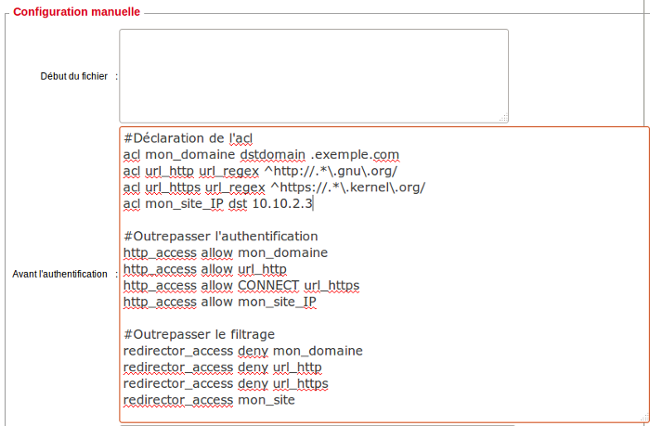
ACLs must appear in the proxy configuration file.
vim /etc/squid3/squid3.conf
Which gives:
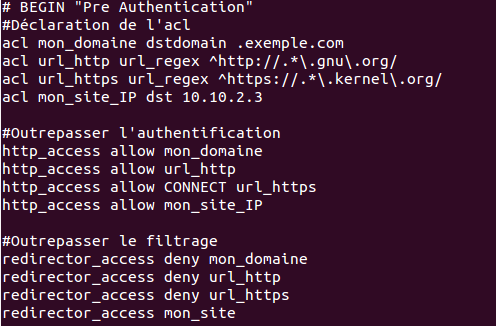
dstdomain: for a domain
dst: for an IP address
url_regex: for a URL
Complete list of squid directives:http://www.squid-cache.org/Doc/config/.
To test an ACL before adding it to the webadmin, you must edit the proxy configuration file.
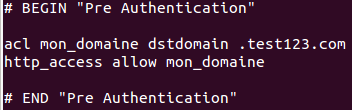
The ACL above allows (and bypasses authentication) for requests to the test123.com domain.
squid3 -k parse -f /etc/squid3/squid3.conf
If no alerts appear for the ACL that has been added, it is possible to reload squid without having to restart it:
squid3 -k reconfigure -f /etc/squid3/squid3.conf